Case study: 3K PBMC Epi Multiome ATAC + Gene Expression
In this case study, we will explain how to process 10X Epi Multiome ATAC + Gene Expression data by using the following test dataset: PBMC from a Healthy Donor - No Cell Sorting (3k).
Learning objectives
Download input data
Here we will download the 3K PBMC Epi Multiome ATAC + Gene Expression input data and the human reference genome for Cell Ranger ARC:
Download 10X Epi Multiome ATAC + Gene Expression data
mkdir tests/PBMC_3K_MULTIOME && cd tests/PBMC_3K_MULTIOME

# Input Files: 3K PBMC Epi Multiome ATAC + Gene Expression
wget https://s3-us-west-2.amazonaws.com/10x.files/samples/cell-arc/2.0.0/pbmc_unsorted_3k/pbmc_unsorted_3k_fastqs.tar
wget https://cf.10xgenomics.com/samples/cell-arc/2.0.0/pbmc_unsorted_3k/pbmc_unsorted_3k_library.csv

# Human reference genome
wget "https://cf.10xgenomics.com/supp/cell-arc/refdata-cellranger-arc-GRCh38-2024-A.tar.gz"
Extract files
tar -xvf pbmc_unsorted_3k_fastqs.tar
tar -xvf refdata-cellranger-arc-GRCh38-2024-A.tar.gz
Set up the input files
Initialize a config file:
pipeline_config.yaml
Run the following command to generate a config file with all available ARC (multiome) parameters:
sc-preprocess init-config --modality arc --output pipeline_config.yaml
This writes every parameter with its default value and inline comments. Fields marked # REQUIRED must be filled in before running. Optional steps (doublet_detection, demultiplexing) are included but set to enabled: false — set them to true to activate them. For demultiplexing, both method blocks (demuxalot and vireo) are always printed — only the one matching method: is used; the other is ignored.
Make a
libraries_list.tsv
This file contains the paths to 3-column library CSV files which contain paths to the multiome data.
echo -e "batch\tcapture\tCSV" > libraries_list.tsv
echo -e "1\tA\tpbmc_unsorted_3k_library.csv" >> libraries_list.tsv
The 3-column library CSV file came with the data you downloaded at the beginning of this tutorial: pbmc_unsorted_3k_library.csv
📌 Note: Update the paths in
pbmc_unsorted_3k_library.csvto absolute paths otherwise Cell Ranger ARC will be upset.
FASTQ_DIR=$(realpath pbmc_unsorted_3k)
sed -i "s|/path/to/fastqs/pbmc_unsorted_3k/gex|${FASTQ_DIR}/gex|; s|/path/to/fastqs/pbmc_unsorted_3k/atac|${FASTQ_DIR}/atac|" pbmc_unsorted_3k_library.csv
Finish filling out the pipeline_config.yaml with paths to necessary files e.g. libraries_list.tsv and reference genome path:
project_name: 3K_PBMC_MULTIOME_PROCESSED
output_dir: 3K_PBMC_MULTIOME_PROCESSED
resources:
  mem_gb: 32
  tmpdir: ''
directories_suffix: none
cellranger_arc:
  enabled: true
  reference: /path/to/refdata-cellranger-arc-GRCh38-2024-A # <- add the correct path!
  libraries: libraries_list.tsv
  normalize: none
  directories:
    LOGS_DIR: 00_LOGS
  threads: 10
  mem_gb: 64
  runtime_minutes: 720  # max SLURM job runtime in minutes (default: 720 = 12 hours)
  # cellranger_arc_aggr
  aggr:
    threads: 16
    mem_gb: 64
    runtime_minutes: 240
  # create_arc_mudata
  anndata:
    threads: 16
    mem_gb: 32
    runtime_minutes: 120
  # aggregate_arc_batch
  batch_aggregation:
    threads: 16
    mem_gb: 32
    runtime_minutes: 120
doublet_detection:
  enabled: true
  method: scrublet
  scrublet:
    filter_cells_min_genes: 100
    filter_genes_min_cells: 3
    expected_doublet_rate: 0.06
    min_gene_variability_pctl: 85.0
    n_prin_comps: 30
    sim_doublet_ratio: 2.0
    random_state: 0
Run the tool
Dry-run
Before running the workflow it’s best practice to run a dry-run - a Snakemake command that will test the workflow without executing the underlying rules and print out it’s gameplan for every job in the workflow. The most informative part for us is the Job stats section which we highlight below. Job stats counts how many times individual Rules will be run and acts as a fantastic sanity check prior to executing the workflow. For example, if you have three multiome captures, then the Rule cellranger_arc_count should be run three times. In this case study, we only have one capture so all Rules are executed once.
# Read about this command
sc-preprocess run -h

# Dry run
$ sc-preprocess run --config-file pipeline_config.yaml --cores 1 --dry-run
[INFO] Config validated. Enabled steps: cellranger_arc, doublet_detection
[INFO] Running Snakemake with command: snakemake --snakefile /path/to/sc_preprocess/workflows/main.smk --configfile pipeline_config.yaml --cores 1 --use-conda --dry-run
[INFO] ============================================================
[INFO] Single-Cell Preprocessing Pipeline
[INFO] ============================================================
[INFO] Project: 3K_PBMC_MULTIOME_PROCESSED
[INFO] Output directory: 3K_PBMC_MULTIOME_PROCESSED
[INFO] Enabled steps: cellranger_arc, doublet_detection
[INFO] ============================================================
[WARNING] Row 2 in 'libraries_list.tsv': Converting relative path 'pbmc_unsorted_3k_library.csv' to absolute path '/path/to/PBMC_3K_MULTIOME/pbmc_unsorted_3k_library.csv'
[WARNING] Row 2 in 'libraries_list.tsv': Converting relative path 'pbmc_unsorted_3k_library.csv' to absolute path '/path/to/PBMC_3K_MULTIOME/pbmc_unsorted_3k_library.csv'
[INFO] libraries_list.tsv file format is valid.
[INFO] libraries_list.tsv file format is valid.
[INFO] Cell Ranger ARC: Found 1 capture(s) across 1 batch(es)
[INFO] Cell Ranger ARC: Found 1 capture(s) across 1 batch(es)
[INFO] Batch aggregation: Found 1 ARC batch(es)
[INFO] Batch aggregation: Found 1 ARC batch(es)
[INFO] Doublet Detection: Using scrublet method
[INFO] Doublet Detection: Using scrublet method
host: midway3-login4.rcc.local
Building DAG of jobs...
Job stats:
job                     count
--------------------  -------
aggregate_arc_batch         1
all                         1
cellranger_arc_aggr         1
cellranger_arc_count        1
create_arc_mudata           1
enrich_arc_metadata         1
run_scrublet                1
total                       7

...
Visualize the workflow with a DAG file
Our favorite way to visualize a dry-run of a workflow is to examine the DAG file. This image represents the network of jobs and dependencies found in the dry-run of the workflow. Each node is a job and each arrow represents a dependent rule.
📌 Note: If the rules are circles then the rule has not been run yet, however, if the rules are bordered with dotted lines then it’s been completed. This distinction is valuable when examining an incomplete workflow.
sc-preprocess run --config-file pipeline_config.yaml --cores 1 --dag | dot -Tpng > dag_arc_3k.png
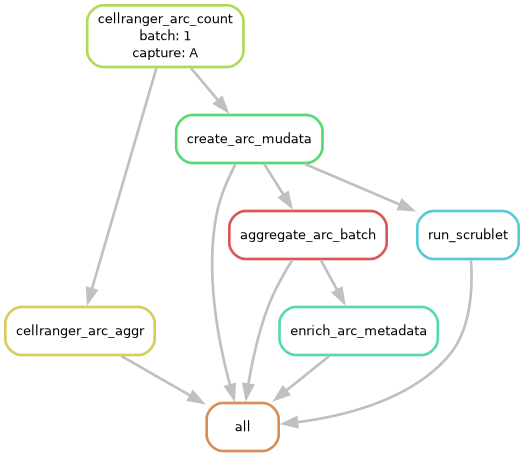
Multiome Pipeline DAG — DAG file showing all rules and their dependencies.
Rule descriptions
Here we will break down the meaning of each rule so you can keep track of what’s going on.
cellranger_arc_count: Runs the command cellranger-arc count per capture, aligning GEX and ATAC reads to the reference genome and producing a joint feature-barcode matrix.
create_arc_mudata: Converts data from the Cell Ranger ARC output to per-capture MuData object (
.h5mu) using the command mu.read_10x_mtx(), adding traceability metadata (batch_id,capture_id,cell_id).cellranger_arc_aggr: Runs cellranger-arc aggr which aggregates all per-capture Cell Ranger ARC outputs within a batch into a single normalized count matrix.
aggregate_arc_batch: Merges all per-capture MuData objects into a single batch-level
.h5mufile, verifyingcell_iduniqueness across captures.run_scrublet: Runs Scrublet doublet detection on the GEX modality of each per-capture MuData object, adding doublet scores and predictions to cell metadata.
enrich_arc_metadata: Joins all downstream preprocessing metadata from demultiplexing and doublet detection into the batch-level MuData object.
all: Final Snakemake rule that collects all expected outputs to ensure the full workflow is completed.
Local Execution
# Local execution
sc-preprocess run --config-file pipeline_config.yaml --cores 1
Snakemake arguments
We added the parameter --snakemake-args to send arguments straight to Snakemake!
For example, a popular Snakemake argument is --keep-going, where Snakemake will continue running jobs even if one fails. Please note that is MUST be the last argument in the command. Here is what is looks like in practice:
sc-preprocess run --config-file pipeline_config.yaml \
                             --cores 1 \
                             --dry-run \
                             --snakemake-args --keep-going
Another useful argument is --forcerun, which forces Snakemake to re-execute a specific rule and all rules that depend on it — without re-running expensive upstream steps like Cell Ranger. This is handy when you update a script and only want to reprocess from that point forward:
sc-preprocess run --config-file pipeline_config.yaml \
                             --cores 1 \
                             --snakemake-args "--forcerun create_arc_mudata aggregate_arc_batch"
📌 Note: You can pass multiple rule names to
--forcerun. Snakemake will automatically re-run all downstream rules that depend on the forced rules.
Run jobs in parallel!
Make a Snakemake SLURM configuration file
📌 Note: Replace the BASH variables
SLURM_ACCOUNTandSLURM_PARTITIONwith your SLURM appropriate setting before running the script below.
# Set your SLURM account and partition
SLURM_ACCOUNT=""   # <- replace with your account
SLURM_PARTITION=""    # <- replace with your partition

mkdir -p HPC_profiles
cat > HPC_profiles/config.yaml << EOF
executor: slurm
jobs: 10
default-resources:
- slurm_account=${SLURM_ACCOUNT}
- slurm_partition=${SLURM_PARTITION}
- runtime=720
retries: 2
latency-wait: 60
printshellcmds: true
keep-going: true
rerun-incomplete: true
EOF
# HPC execution - `--cores all` tell snakemake to use the `threads` assigned to each rule.
sc-preprocess run --config-file pipeline_config.yaml \
                             --cores all \
                             --snakemake-args --profile HPC_profiles --keep-going
Cell Ranger cluster mode
By default, cellranger-arc count runs all of its internal pipeline stages on the same node as the Snakemake job. On large datasets this can be slow because Cell Ranger ARC is limited to the cores allocated to that single SLURM job.
Cluster mode lets Cell Ranger ARC submit each of its internal pipeline stages as independent SLURM jobs, parallelizing the work across your cluster. You can read about how to set it up here
To enable, add a cluster-mode: block with enabled: true to cellranger_arc in your config:
cellranger_arc:
  enabled: true
  reference: /path/to/refdata-cellranger-arc-GRCh38-2024-A
  libraries: libraries_list.tsv
  normalize: none
  threads: 1        # lightweight — just the cellranger-arc count wrapper process
  mem_gb: 8         # memory for the wrapper job only
  cluster-mode:
    enabled: true   # submit Cell Ranger ARC subjobs via the cluster scheduler
    jobmode: slurm  # Cell Ranger ARC submits its own SLURM subjobs
    mempercore: 8   # GB of RAM per core on your cluster nodes
    maxjobs: 64     # max Cell Ranger ARC subjobs running at once
  directories:
    LOGS_DIR: 00_LOGS
Field |
Description |
|---|---|
|
|
|
|
|
GB of RAM per CPU core on your cluster nodes — tells Cell Ranger ARC how to size its subjobs |
|
Maximum number of Cell Ranger ARC subjobs submitted at once |
|
Milliseconds between job submissions (optional, default is fine) |
You can confirm cluster mode is active by checking the log file — each pipeline stage will show (run:slurm) instead of (run:local):
2026-04-13 13:20:25 [runtime] (run:slurm)   ID.1_A.SC_RNA_COUNTER_CS.WRITE_GENE_INDEX.fork0.chnk0.main
2026-04-13 13:20:37 [runtime] (run:slurm)   ID.1_A.SC_RNA_COUNTER_CS.DETECT_CHEMISTRY.fork0.chnk0.main
Resuming a killed run: If the job is killed mid-run, Cell Ranger ARC’s Martian runtime saves checkpoints after each completed stage. The pipeline automatically removes the _lock file left by the killed process, so resubmitting the Snakemake job will resume from the last completed stage rather than starting over.
Interpreting STDOUT
After starting the program you should see an output that looks like this, let’s break it down:
$ sc-preprocess run --config-file pipeline_config.yaml \
                               --cores all \
                               --snakemake-args --profile HPC_profiles
[INFO] Config validated. Enabled steps: cellranger_arc, doublet_detection
[INFO] Running Snakemake with command: snakemake --snakefile /path/to/sc_preprocess/workflows/main.smk --configfile pipeline_config.yaml --cores all --use-conda --profile HPC_profiles
Using profile HPC_profiles for setting default command line arguments.
[INFO] ============================================================
[INFO] Single-Cell Preprocessing Pipeline
[INFO] ============================================================
[INFO] Project: 3K_PBMC_MULTIOME_PROCESSED
[INFO] Output directory: 3K_PBMC_MULTIOME_PROCESSED
[INFO] Enabled steps: cellranger_arc, doublet_detection
[INFO] ============================================================
[WARNING] Row 2 in 'libraries_list.tsv': Converting relative path 'pbmc_unsorted_3k_library.csv' to absolute path '/path/to/PBMC_3K_MULTIOME/pbmc_unsorted_3k_library.csv'
[WARNING] Row 2 in 'libraries_list.tsv': Converting relative path 'pbmc_unsorted_3k_library.csv' to absolute path '/path/to/PBMC_3K_MULTIOME/pbmc_unsorted_3k_library.csv'
[INFO] libraries_list.tsv file format is valid.
[INFO] libraries_list.tsv file format is valid.
[INFO] Cell Ranger ARC: Found 1 capture(s) across 1 batch(es)
[INFO] Cell Ranger ARC: Found 1 capture(s) across 1 batch(es)
[INFO] Batch aggregation: Found 1 ARC batch(es)
[INFO] Batch aggregation: Found 1 ARC batch(es)
[INFO] Doublet Detection: Using scrublet method
[INFO] Doublet Detection: Using scrublet method
host: midway3-login1.rcc.local
Building DAG of jobs...
SLURM run ID: d1ae475f-13fd-4b08-a17d-256664e8ad48
MinJobAge 120s (>= 120s). 'squeue' should work reliably for status queries.
Using shell: /usr/bin/bash
Provided remote nodes: 10
Job stats:
job                     count
--------------------  -------
aggregate_arc_batch         1
all                         1
cellranger_arc_aggr         1
cellranger_arc_count        1
create_arc_mudata           1
enrich_arc_metadata         1
run_scrublet                1
total                       7

Select jobs to execute...
Execute 1 jobs...

[Tue Mar  3 10:17:20 2026]
rule cellranger_arc_count:
    input: /path/to/refdata-cellranger-arc-GRCh38-2024-A, pbmc_unsorted_3k_library.csv
    output: 3K_PBMC_MULTIOME_PROCESSED/01_CELLRANGERARC_COUNT/1_A/outs/filtered_feature_bc_matrix.h5, 3K_PBMC_MULTIOME_PROCESSED/01_CELLRANGERARC_COUNT/1_A/outs/atac_fragments.tsv.gz, 3K_PBMC_MULTIOME_PROCESSED/01_CELLRANGERARC_COUNT/1_A/outs/gex_possorted_bam.bam, 3K_PBMC_MULTIOME_PROCESSED/01_CELLRANGERARC_COUNT/1_A/outs/filtered_feature_bc_matrix/barcodes.tsv.gz, 3K_PBMC_MULTIOME_PROCESSED/01_CELLRANGERARC_COUNT/1_A/outs/web_summary.html, 3K_PBMC_MULTIOME_PROCESSED/00_LOGS/1_A_arc_count.done
    log: 3K_PBMC_MULTIOME_PROCESSED/00_LOGS/1_A_arc_count.log
    jobid: 2
    reason: Missing output files: 3K_PBMC_MULTIOME_PROCESSED/01_CELLRANGERARC_COUNT/1_A/outs/filtered_feature_bc_matrix.h5, 3K_PBMC_MULTIOME_PROCESSED/00_LOGS/1_A_arc_count.done, 3K_PBMC_MULTIOME_PROCESSED/01_CELLRANGERARC_COUNT/1_A/outs/atac_fragments.tsv.gz; Set of input files has changed since last execution
    wildcards: batch=1, capture=A
    threads: 8
    resources: mem_mb=65536, mem_mib=62500, disk_mb=1000, disk_mib=954, tmpdir=<TBD>, slurm_account=pi-lbarreiro, slurm_partition=lbarreiro, runtime=720
Shell command: None
Job 2 has been submitted with SLURM jobid 46363794 (log: /path/to/PBMC_3K_MULTIOME/.snakemake/slurm_logs/rule_cellranger_arc_count/1_A/46363794.log).
Messages from this tool will always be prefaced in brackets e.g. [INFO], [WARNING], [ERROR].
The first [INFO] prints the preprocessing steps enabled in the config file. In this tutorial, we enabled Cell Ranger ARC to process the 3K PBMC Epi Multiome ATAC + Gene Expression input data and Doublet detection with Scrublet:
[INFO] Config validated. Enabled steps: cellranger_arc, doublet_detection
Next, we print the Snakemake command running under the hood for convenient debugging. The --snakefile path will reflect where sc-preprocess is installed in your environment — this is expected and you don’t need to use this path directly.
[INFO] Running Snakemake with command: snakemake --snakefile /path/to/sc_preprocess/workflows/main.smk --configfile pipeline_config.yaml --cores all --use-conda --profile HPC_profiles
After that, we print some more [INFO] about the run:
[INFO] ============================================================
[INFO] Single-Cell Preprocessing Pipeline
[INFO] ============================================================
[INFO] Project: 3K_PBMC_MULTIOME_PROCESSED
[INFO] Output directory: 3K_PBMC_MULTIOME_PROCESSED
[INFO] Enabled steps: cellranger_arc, doublet_detection
[INFO] ============================================================
Additionally, we always let you know with a [WARNING] if we change anything from your input files on the fly:
[WARNING] Row 2 in 'libraries_list.tsv': Converting relative path 'pbmc_unsorted_3k_library.csv' to absolute path '/path/to/PBMC_3K_MULTIOME/pbmc_unsorted_3k_library.csv'
📌 Note: You may see some messages printed twice. This is expected — Snakemake evaluates the config in two passes during DAG construction.
Finally, we print [INFO] from every job so you can fact check your workflow i.e. are these number of batches and samples you were expecting to preprocess?
[INFO] libraries_list.tsv file format is valid.
[INFO] Cell Ranger ARC: Found 1 capture(s) across 1 batch(es)
[INFO] Batch aggregation: Found 1 ARC batch(es)
[INFO] Doublet Detection: Using scrublet method
Everything else are messages directly from Snakemake running the workflow you configured! If you are new to Snakemake please take some time to orient yourself: https://snakemake.readthedocs.io/en/stable/tutorial/tutorial.html
Log file paths for every Rule will be printing in the Snakemake stdout like this:
log: 3K_PBMC_MULTIOME_PROCESSED/00_LOGS/1_A_arc_count.log
For example, you could explore the log for that Cell Ranger ARC job by printing the log file like this:
$ cat 3K_PBMC_MULTIOME_PROCESSED/00_LOGS/1_A_arc_count.log
Martian Runtime - v4.0.5
Serving UI at http://midway3-0323.rcc.local:44865?auth=nTZ0qkEGdaSUvGtvxqySJq1uPiYiQHQQ5nIFFKYaxgM

Running preflight checks (please wait)...
Checking FASTQ folder...
Checking reference...
Checking reference_path (/path/to/refdata-cellranger-arc-GRCh38-2024-A) on midway3-0323.rcc.local...
Checking optional arguments...

...

2026-03-03 10:30:40 [runtime] (chunks_complete) ID.1_A.SC_ATAC_GEX_COUNTER_CS.SC_ATAC_GEX_COUNTER._GEX_MATRIX_COMPUTER.MAKE_SHARD
2026-03-03 10:30:40 [runtime] (run:local)       ID.1_A.SC_ATAC_GEX_COUNTER_CS.SC_ATAC_GEX_COUNTER._GEX_MATRIX_COMPUTER.MAKE_SHARD.fork0.join
2026-03-03 10:30:43 [runtime] (update)          ID.1_A.SC_ATAC_GEX_COUNTER_CS.SC_ATAC_GEX_COUNTER._ATAC_MATRIX_COMPUTER.ALIGN_ATAC_READS.fork0 chunks running (0/9 completed)
Examine the output directory structure
After successfully completing the workflow, you should see this resulting directory structure. Let’s break it down:
$ tree -L 2 3K_PBMC_MULTIOME_PROCESSED/
3K_PBMC_MULTIOME_PROCESSED/
├── 00_LOGS
│   ├── 1_A_arc_count.done
│   ├── 1_A_arc_count.log
│   ├── 1_A_arc_mudata.done
│   ├── 1_A_arc_mudata.log
│   ├── 1_arc_aggr.done
│   ├── 1_arc_aggr.log
│   ├── 1_arc_batch_aggregation.done
│   ├── 1_arc_batch_aggregation.log
│   ├── 1_arc_enrichment.done
│   ├── 1_arc_enrichment.log
│   ├── 1_A_scrublet.done
│   └── 1_A_scrublet.log
├── 01_CELLRANGERARC_COUNT
│   └── 1_A
├── 02_CELLRANGERARC_AGGR
│   └── 1_aggregation.csv
├── 03_ANNDATA
│   └── 1_A.h5mu
├── 04_BATCH_OBJECTS
│   └── 1_arc.h5mu
├── 06_DOUBLET_DETECTION
│   └── 1_A_scrublet.tsv.gz
└── 07_FINAL
    ├── 1_arc.h5mu
    ├── 1_arc_obs_summary.tsv.gz
    └── 1_arc_obs.tsv.gz
00_LOGS/
This directory contains all the .log and .done files created throughout the workflow and are organized by Batch_Capture_modality_rule. The .log files will contain any STDOUT printed from every step of the workflow. This allows you to dive in and interrogate any step of your single-cell preprocessing.
A quick way to find errors if you are debugging the workflow is to run:
grep -R "error" 3K_PBMC_MULTIOME_PROCESSED/00_LOGS
The .done files are an internal checklist to keep track of a subset of rules that finished (don’t worry about it unless you are a developer and want to contribute to the code base).
01_CELLRANGERARC_COUNT/
Here you will find all of the Cell Ranger count outputs for each individual capture.
02_CELLRANGERARC_AGGR/
This will be the aggregated count matrices across batches. In this tutorial there is only one capture so you won’t find any processed data here.
03_ANNDATA/
Here you will find MuData objects for every capture. In this case it will be Muon because multiome.
04_BATCH_OBJECTS/
Batch-level MuData object created by merging all per-capture objects from 03_ANNDATA/. This is the aggregated, pre-metadata-enriched object — all cells from all captures in the batch are present, and cell_id uniqueness is verified. It does not yet contain doublet scores or demultiplexing results.
06_DOUBLET_DETECTION/
Doublet detection outputs from Scrublet
* 07_FINAL/
Next, we print the Snakemake command running under the hood for convenient debugging. The --snakefile path will reflect where sc-preprocess is installed in your environment — this is expected and you don’t need to use this path directly.
1_arc.h5mu
1_arc_obs_summary.tsv.gz
1_arc_obs.tsv.gz
Load the output for downstream analysis
Examine barcode metadata
Now that you have successfully preprocessed the dataset PBMC from a Healthy Donor - No Cell Sorting (3k) we will show a few examples of how you can immediately start analyzing your data with multiple programs!
Check out a summary of the workflow and barcode metadata with these files:
1_arc_obs.tsv.gz
$ python -c "import pandas as pd; df = pd.read_csv('3K_PBMC_MULTIOME_PROCESSED/07_FINAL/1_arc_obs.tsv.gz', sep='\t'); print(df)"
                     cell_id modality  batch_id capture_id               cell_id.1             barcode  ...  pct_counts_mt  total_counts_ribo  log1p_total_counts_ribo  pct_counts_ribo  doublet_scrublet_scrublet_score  doublet_scrublet_scrublet_predicted_doublet
0     1_A_AAACAGCCAACAGGTG-1      gex         1          A  1_A_AAACAGCCAACAGGTG-1  AAACAGCCAACAGGTG-1  ...      18.262806              113.0                 4.736198         6.291760                         0.065392                                          0.0
1     1_A_AAACATGCAACAACAA-1      gex         1          A  1_A_AAACATGCAACAACAA-1  AAACATGCAACAACAA-1  ...       8.131098               33.0                 3.526361         0.825619                         0.046125                                          0.0
2     1_A_AAACATGCACCTGGTG-1      gex         1          A  1_A_AAACATGCACCTGGTG-1  AAACATGCACCTGGTG-1  ...      77.826090               23.0                 3.178054         5.000000                         0.158837                                          0.0
3     1_A_AAACCAACACAGCCTG-1      gex         1          A  1_A_AAACCAACACAGCCTG-1  AAACCAACACAGCCTG-1  ...      16.805113               86.0                 4.465908         5.495208                         0.048402                                          0.0
4     1_A_AAACCAACAGCAAGAT-1      gex         1          A  1_A_AAACCAACAGCAAGAT-1  AAACCAACAGCAAGAT-1  ...      12.134688               91.0                 4.521789         5.781449                         0.086111                                          0.0
...                      ...      ...       ...        ...                     ...                 ...  ...            ...                ...                      ...              ...                              ...                                          ...
6013  1_A_TTTGTCTAGTCTATGA-1     atac         1          A  1_A_TTTGTCTAGTCTATGA-1  TTTGTCTAGTCTATGA-1  ...            NaN                NaN                      NaN              NaN                         0.014349                                          0.0
6014  1_A_TTTGTGGCAGCACGAA-1     atac         1          A  1_A_TTTGTGGCAGCACGAA-1  TTTGTGGCAGCACGAA-1  ...            NaN                NaN                      NaN              NaN                         0.126394                                          0.0
6015  1_A_TTTGTGGCATCGCTCC-1     atac         1          A  1_A_TTTGTGGCATCGCTCC-1  TTTGTGGCATCGCTCC-1  ...            NaN                NaN                      NaN              NaN                         0.019632                                          0.0
6016  1_A_TTTGTGTTCACTTCAT-1     atac         1          A  1_A_TTTGTGTTCACTTCAT-1  TTTGTGTTCACTTCAT-1  ...            NaN                NaN                      NaN              NaN                         0.086111                                          0.0
6017  1_A_TTTGTGTTCATGCGTG-1     atac         1          A  1_A_TTTGTGTTCATGCGTG-1  TTTGTGTTCATGCGTG-1  ...            NaN                NaN                      NaN              NaN                         0.058992                                          0.0

[6018 rows x 18 columns]
1_arc_obs_summary.tsv.gz
$ python -c "import pandas as pd; df = pd.read_csv('3K_PBMC_MULTIOME_PROCESSED/07_FINAL/1_arc_obs_summary.tsv.gz', sep='\t'); print(df)"
  modality  batch_id  n_cells  median_umi  median_genes  median_fragments  median_peaks
0      gex         1     3009      2764.0        1494.0               NaN           NaN
1     atac         1     3009         NaN           NaN               0.0           0.0
Muon
📌 Note: A companion Jupyter notebook for loading the output and generating QC visualizations is available at
notebooks/PBMC_3k_multiome_analysis.ipynb.
The final MuData object in 07_FINAL/ contains both GEX and ATAC modalities with all preprocessing metadata joined in. Load it with:
import muon as mu
import scanpy as sc

mdata = mu.read("3K_PBMC_MULTIOME_PROCESSED/07_FINAL/1_arc.h5mu")

# Inspect the data
print(mdata)
print(f"\nTotal cells: {mdata.n_obs}")
print(f"\nModalities: {list(mdata.mod.keys())}")
print(f"\nGEX shape: {mdata['gex'].shape}")
print(f"\nATAC shape: {mdata['atac'].shape}")
print(f"\nObs columns: {list(mdata.obs.columns)}")
MuData object with n_obs × n_vars = 3009 × 117757
  obs:  'batch_id', 'capture_id', 'cell_id'
  var:  'gene_ids', 'feature_types', 'n_cells_by_counts', 'mean_counts', ...
  2 modalities
    atac: 3009 x 81156
      obs: 'batch_id', 'capture_id', 'cell_id', 'barcode',
           'n_genes_by_counts', 'total_counts', ...,
           'doublet_scrublet_scrublet_score', 'doublet_scrublet_scrublet_predicted_doublet'
      var: 'gene_ids', 'feature_types', 'n_cells_by_counts', ...
    gex:  3009 x 36601
      obs: 'batch_id', 'capture_id', 'cell_id', 'barcode',
           'n_genes_by_counts', 'total_counts', 'pct_counts_mt', 'pct_counts_ribo', ...,
           'doublet_scrublet_scrublet_score', 'doublet_scrublet_scrublet_predicted_doublet'
      var: 'gene_ids', 'feature_types', 'mt', 'ribo', 'n_cells_by_counts', ...

Total cells: 3009
Modalities: ['atac', 'gex']
GEX shape:  (3009, 36601)
ATAC shape: (3009, 81156)

Obs columns: ['atac:batch_id', 'atac:capture_id', 'atac:cell_id', ...,
              'gex:batch_id',  'gex:capture_id',  'gex:cell_id',  ...,
              'batch_id', 'capture_id', 'cell_id']
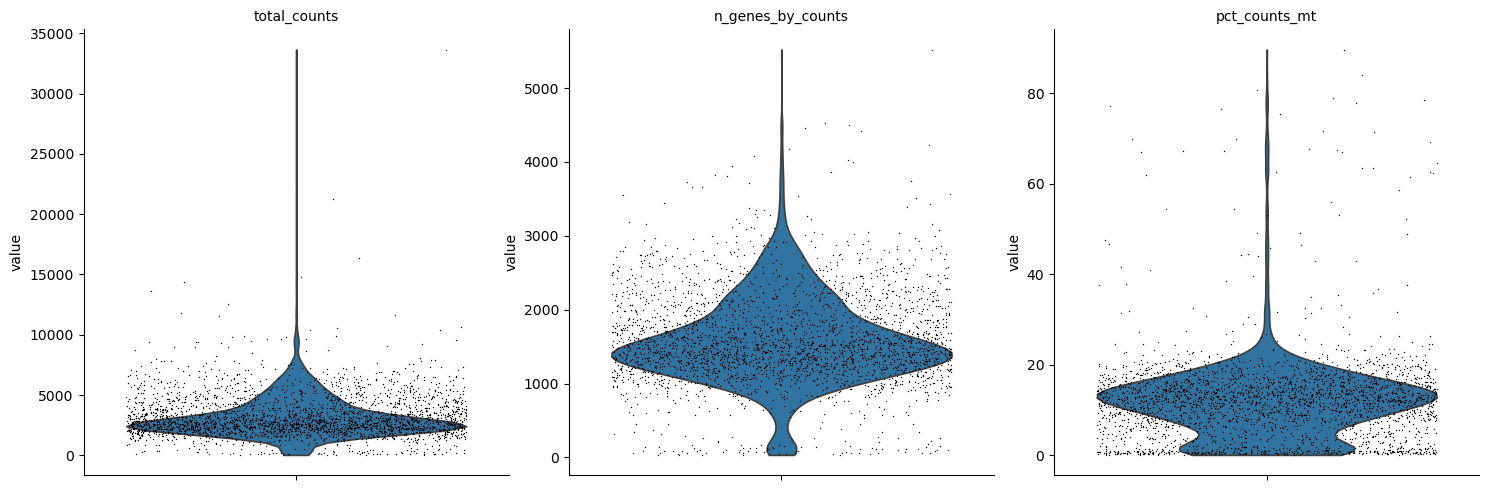
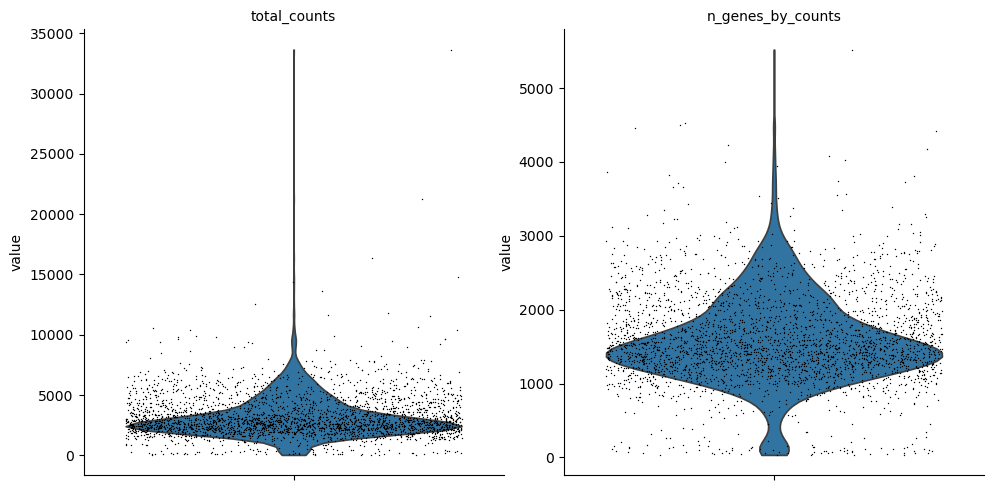
Immediately visualize QC metrics for GEX and ATAC:
GEX
sc.pl.violin(mdata["gex"], ['total_counts', 'n_genes_by_counts', 'pct_counts_mt'], jitter=0.4, multi_panel=True)
ATAC
sc.pl.violin(mdata["atac"], ['total_counts', 'n_genes_by_counts'], jitter=0.4, multi_panel=True)
Seurat/Signac
ArchR
For common questions about re-running steps, .done file tracking, and cluster-mode lock files, see the FAQ.