Cell Ranger Multi
In this tutorial we will explore how you can used sc-preprocess to run Cell Ranger multi to process multiple modalities in a single run: gene expression, V(D)J immune profiling (TCR, BCR), antibody capture (CITE-seq), and Flex fixed RNA profiling.
Overview
What sc-preprocess produces
For each capture, sc-preprocess runs cellranger multi, then creates one .h5mu (MuData) per capture. The final MuData combines data from all processed modalities into one object making it easy to continue your data analysis! Modalities present in the output depend on what was declared in your multi config CSV:
Input libraries |
MuData modalities |
|---|---|
GEX only |
|
GEX + VDJ-T (TCR) |
|
GEX + VDJ-B (BCR) |
|
GEX + VDJ-T + VDJ-B |
|
GEX + Antibody Capture |
|
GEX + VDJ-T + VDJ-B + Antibody Capture |
|
Flex multiplexed |
|
Cell ID format
Every cell gets a globally unique cell_id:
Mode |
Format |
Example |
|---|---|---|
Standard (5’ multi, singleplex Flex) |
|
|
Multiplexed Flex (multiple samples per capture) |
|
|
airr modality structure
The airr modality is an AnnData object in scirpy format that stores V(D)J immune profiling data such as VDJ-T (TCR) and VDJ-B (BCR). Only cells where at least one receptor chain was detected are present — airr will have fewer observations than gex. If both are present they are merged via ir.pp.merge_airr(). Note that sc-preprocess the scirpy commands scirpy.pp.index_chains and scirpy.tl.chain_qc will be ran so you can immediately work with your VDJ modality downstream.
Component |
Content |
|---|---|
|
One row per cell with a detected receptor chain |
|
Awkward array of receptor chain records (AIRR-C schema): |
|
Heavy/beta chain locus: |
|
Light/alpha chain locus: |
|
|
|
|
|
Traceability columns |
|
Empty — receptor data lives in |
Counting receptor subtypes
import muon as mu

mdata = mu.read("path/to/1_A.h5mu")

# receptor_type / receptor_subtype are already populated by ir.tl.chain_qc()
mdata["airr"].obs["receptor_type"].value_counts()
# TCR          712
# BCR          203
# multichain     8

mdata["airr"].obs["receptor_subtype"].value_counts()
# TRA+TRB    695
# IGH+IGK    138
# IGH+IGL     65
# ...

# Or group by individual chain loci
mdata["airr"].obs.groupby(["airr_VDJ_1_locus", "airr_VJ_1_locus"]).size()
Key concept: the multi config CSV
Unlike other Cell Ranger programs, cellranger multi takes a per-capture multi config CSV instead of a simple reference + FASTQs path. This CSV declares:
[gene-expression]— GEX reference (5’ multi) or probe set (Flex)[vdj]— VDJ reference for TCR/BCR (optional)[feature]— antibody/CRISPR feature reference (optional)[libraries]— FASTQ paths and feature types per library[samples]— probe barcode → sample ID mapping for multiplexed Flex (optional)
The pipeline config (pipeline_config_multi.yaml) only points to the multi config CSV — all references go inside the CSV itself.
Please make sure to fill out your multi config CSV with the appropriate paths!
Common Setup
These two files are required regardless of which modality cellranger multi is processing.
1. Create a libraries_list.tsv
This file maps each capture to its multi config CSV:
echo -e "batch\tcapture\tCSV" > libraries_list.tsv
echo -e "1\tA\t/path/to/capture_A_multi_config.csv" >> libraries_list.tsv
Column |
Description |
|---|---|
|
Batch identifier (e.g. |
|
Lane/capture identifier (e.g. |
|
Path to the per-capture multi config CSV |
📌 Note: Make sure to add the path to
pipeline_config_multi.yamlin the config file in the next step.
2. Generate a pipeline config
sc-preprocess init-config --modality multi --output pipeline_config_multi.yaml
This writes every parameter with its default value and inline comments. Fields marked # REQUIRED must be filled in. Optional steps (doublet_detection, demultiplexing) are included but set to enabled: false — set them to true to activate. For demultiplexing, both method blocks (demuxalot and vireo) are always printed — only the one matching method: is used.
project_name: my_project  # REQUIRED
output_dir: output  # REQUIRED

resources:
  mem_gb: 32  # default memory; individual steps override this with their own mem_gb
  tmpdir: ""  # temp directory for large file operations

directories_suffix: none  # suffix appended to output directory names; "none" to disable

cellranger_multi:
  enabled: true
  libraries: /path/to/libraries_list.tsv  # REQUIRED: TSV with columns: batch, capture, CSV
  # No reference field — declare reference(s) inside each capture's multi config CSV.
  # The multi config CSV also specifies: probe-set (Flex), [vdj] reference, [feature] reference.
  # See: https://www.10xgenomics.com/support/software/cell-ranger/latest/analysis/running-pipelines/cr-5p-multi
  # Flex: https://www.10xgenomics.com/support/software/cell-ranger/latest/analysis/running-pipelines/cr-flex-multi-frp
  threads: 10
  mem_gb: 64
  runtime_minutes: 720
  cluster-mode:          # cellranger cluster-mode: see https://www.10xgenomics.com/support/software/cell-ranger/latest/advanced/cr-cluster-mode
    enabled: false       # set true to submit Cell Ranger jobs via a cluster scheduler
    jobmode: slurm       # slurm | lsf | sge | /path/to/custom.template
    mempercore: null     # SLURM users: leave null — memory is requested directly via --mem=__MRO_MEM_GB__G
    maxjobs: 64          # max concurrent cluster subjobs
    jobinterval: null    # delay between submissions in ms; increase if cluster rate-limits
  # create_multi_mudata (VDJ + protein loading can be memory-intensive)
  anndata:
    threads: 16
    mem_gb: 32
    runtime_minutes: 120

doublet_detection:
  enabled: false
  method: scrublet  # only supported method
  threads: 1
  mem_gb: 16
  scrublet:
    filter_cells_min_genes: 100
    filter_genes_min_cells: 3
    expected_doublet_rate: 0.06
    min_gene_variability_pctl: 85.0
    n_prin_comps: 30
    sim_doublet_ratio: 2.0
    threshold: null  # doublet score cutoff; auto-determined if null
    n_neighbors: null  # KNN neighbors; auto-set to 0.5*sqrt(n_obs) if null
    random_state: 0

demultiplexing:
  enabled: false
  method: vireo  # options: demuxalot, vireo — only the selected method is used
  demuxalot:  # genotype-based; GEX only
    vcf: /path/to/genotypes.vcf  # REQUIRED
    genome_names: /path/to/genome_names.txt  # REQUIRED
    refine: false  # run genotype refinement step
    celltag: CB
    umitag: UB
  vireo:  # SNP-based; works with all modalities
    donors: 4  # REQUIRED: number of donors
    cellsnp:
      vcf: /path/to/variants.vcf  # REQUIRED
      threads: 4
      min_maf: 0.0
      min_count: 1
      umi_tag: Auto
      cell_tag: CB
      gzip: true
Rule descriptions
Here we will break down the meaning of each rule so you can keep track of what’s going on.
cellranger_multi_count: Runs cellranger multi per capture using the per-capture multi config CSV, producing per-sample gene-barcode matrices, VDJ assemblies, and antibody count matrices depending on which library types are declared.
create_multi_mudata: Converts Cell Ranger multi output into a per-capture MuData object (
.h5mu), assemblinggex,prot(if Antibody Capture present), andairr(if VDJ-T/VDJ-B present) modalities, and adding traceability metadata (batch_id,capture_id,cell_id) to all modalities.aggregate_multi_batch: Merges all per-capture MuData objects within a batch into a single batch-level
.h5mufile, concatenating each modality separately and verifyingcell_iduniqueness across captures.run_scrublet: Runs Scrublet doublet detection on the
gexmodality of each per-capture MuData object, adding doublet scores and predictions to cell metadata.enrich_multi_metadata: Joins all downstream preprocessing metadata from demultiplexing and doublet detection into the batch-level MuData object and exports a flat per-cell metadata table (
.tsv.gz).all: Final Snakemake rule that collects all expected outputs to ensure the full workflow is completed.
Examples
Example 1: Flex v2
Flex v2 is a 10X protocol that uses whole-transcriptome probe panels for RNAseq vs. standard cDNA strategies. This probe-based chemistry works with PFA-fixed samples. Here we will run through a quick example with sc-preprocess to process this data type.
Dataset: Human Kidney 4k GEM-X Flex Gene Expression
Modality: Flex v2
Output: gex; cell_id = {batch}_{capture}_{sample_id}_{barcode}
Download input data
mkdir tests/FLEX && cd tests/FLEX

wget https://cf.10xgenomics.com/samples/cell-exp/9.0.0/Human_Kidney_4k_GEM-X_Flex_Multiplex/Human_Kidney_4k_GEM-X_Flex_Multiplex_fastqs.tar
tar -xvf Human_Kidney_4k_GEM-X_Flex_Multiplex_fastqs.tar

# Cell Ranger [multi config CSV](https://www.10xgenomics.com/support/software/cell-ranger/latest/analysis/inputs/cr-multi-config-csv-opts)
wget https://cf.10xgenomics.com/samples/cell-exp/9.0.0/Human_Kidney_4k_GEM-X_Flex_Multiplex/Human_Kidney_4k_GEM-X_Flex_Multiplex_config.csv

# 2024-A human reference
wget https://cf.10xgenomics.com/supp/cell-exp/refdata-gex-GRCh38-2024-A.tar.gz
tar -xzf refdata-gex-GRCh38-2024-A.tar.gz

# Human v1.1.0 probe set
wget https://cf.10xgenomics.com/supp/cell-exp/probeset/Chromium_Human_Transcriptome_Probe_Set_v1.1.0_GRCh38-2024-A.csv
Edit the multi config CSV
Update the reference, probe set, and FASTQ paths in Human_Kidney_4k_GEM-X_Flex_Multiplex_config.csv:
REF=/path/to/refdata-gex-GRCh38-2024-A
PROBE=/path/to/Chromium_Human_Transcriptome_Probe_Set_v1.1.0_GRCh38-2024-A.csv
FASTQS=$(pwd)/Human_Kidney_4k_GEM-X_Flex_Multiplex/fastqs

sed -i "s|/path/to/references/GRCh38-2024-A|${REF}|; \
        s|/path/to/references/Chromium_Human_Transcriptome_Probe_Set_v1.1.0_GRCh38-2024-A.csv|${PROBE}|; \
        s|/path/to/fastqs/Human_Kidney_4k_GEM-X_Flex|${FASTQS}|" \
        Human_Kidney_4k_GEM-X_Flex_Multiplex_config.csv
Tip: To test
cellranger multion its own before running the full pipeline:cellranger multi --id=Human_Kidney_4k --csv=Human_Kidney_4k_GEM-X_Flex_Multiplex_config.csv
Set up pipeline files
echo -e "batch\tcapture\tCSV" > libraries_list.tsv
echo -e "1\tA\tHuman_Kidney_4k_GEM-X_Flex_Multiplex_config.csv" >> libraries_list.tsv
Update pipeline_config_multi.yaml (generated in Common Setup):
cellranger_multi.libraries→ path tolibraries_list.tsvoutput_dir→ where to write outputsproject_name→ your project name
Running
# Dry run
sc-preprocess run --config-file pipeline_config_multi.yaml --cores 1 --dry-run

sc-preprocess run --config-file pipeline_config_multi.yaml --cores 1 --dag | dot -Tpng > dag_multi_flex.png
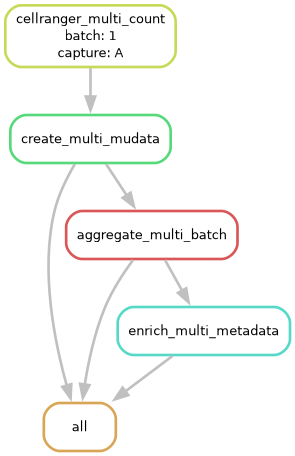
Cell Ranger multi Pipeline DAG processing 10X Flex V2 — DAG file showing all rules and their dependencies.
Estimated runtime: ~45–60 minutes
Step
Time
cellranger multi(alignment, demux, per-sample matrices)~32 min
MuData object creation
~10 min
Setup / conda environment overhead
~5 min
# Local run
sc-preprocess run --config-file pipeline_config_multi.yaml --cores 1

# HPC execution
sc-preprocess run --config-file pipeline_config_multi.yaml \
                  --cores all \
                  --snakemake-args --profile HPC_profiles
Check out the companion Jupyter notebook for loading the output and generating QC visualizations: notebooks/MULTI_FLEX_V2_analysis.ipynb.
Example 2: 5’ GEX + VDJ-B (BCR)
Here we will use sc-preprocess to work through multi-modality data from 10X e.g. GEX and VDJ.
Dataset: Human B cells from a Healthy Donor, 1k cells
Modality: 5’ GEX + VDJ-B
Output: gex + airr; cell_id = {batch}_{capture}_{barcode}
Based on the 10X tutorial: Running Cell Ranger multi with 5’ Immune Profiling Data
Download input data
mkdir tests/GEX_VDJ && cd tests/GEX_VDJ

# FASTQs
wget https://cf.10xgenomics.com/samples/cell-vdj/6.0.0/sc5p_v2_hs_B_1k_multi_5gex_b_Multiplex/sc5p_v2_hs_B_1k_multi_5gex_b_Multiplex_fastqs.tar
tar -xf sc5p_v2_hs_B_1k_multi_5gex_b_Multiplex_fastqs.tar

# GEX reference
curl -O https://cf.10xgenomics.com/supp/cell-exp/refdata-gex-GRCh38-2020-A.tar.gz
tar -xf refdata-gex-GRCh38-2020-A.tar.gz

# VDJ reference
curl -O https://cf.10xgenomics.com/supp/cell-vdj/refdata-cellranger-vdj-GRCh38-alts-ensembl-5.0.0.tar.gz
tar -xf refdata-cellranger-vdj-GRCh38-alts-ensembl-5.0.0.tar.gz

# Multi config CSV
wget https://cf.10xgenomics.com/samples/cell-vdj/6.0.0/sc5p_v2_hs_B_1k_multi_5gex_b_Multiplex/sc5p_v2_hs_B_1k_multi_5gex_b_Multiplex_config.csv
Edit the multi config CSV
GEX_REF=/path/to/refdata-gex-GRCh38-2020-A
VDJ_REF=/path/to/refdata-cellranger-vdj-GRCh38-alts-ensembl-5.0.0
FASTQS1=$(pwd)/sc5p_v2_hs_B_1k_multi_5gex_b_fastqs/sc5p_v2_hs_B_1k_5gex_fastqs
FASTQS2=$(pwd)/sc5p_v2_hs_B_1k_multi_5gex_b_fastqs/sc5p_v2_hs_B_1k_b_fastqs

sed -i "s|/path/to/references/GRCh38-2020-A|${GEX_REF}|; \
        s|/path/to/references/vdj_GRCh38_alts_ensembl-5.0.0|${VDJ_REF}|; \
        s|/path/to/fastqs_multi_vdj/sc5p_v2_hs_B_1k_multi_5gex_b_fastqs/sc5p_v2_hs_B_1k_5gex_fastqs|${FASTQS1}|; \
        s|/path/to/fastqs_multi_vdj/sc5p_v2_hs_B_1k_multi_5gex_b_fastqs/sc5p_v2_hs_B_1k_b_fastqs|${FASTQS2}|; \
        /expect-cells/a create-bam,true" sc5p_v2_hs_B_1k_multi_5gex_b_Multiplex_config.csv
Set up pipeline files
echo -e "batch\tcapture\tCSV" > libraries_list.tsv
echo -e "1\tA\tsc5p_v2_hs_B_1k_multi_5gex_b_Multiplex_config.csv" >> libraries_list.tsv
Update pipeline_config_multi.yaml:
cellranger_multi.libraries→ path tolibraries_list.tsvoutput_dir→ where to write outputsproject_name→ your project name
Running
# Dry run
sc-preprocess run --config-file pipeline_config_multi.yaml --cores 1 --dry-run

sc-preprocess run --config-file pipeline_config_multi.yaml --cores 1 --dag | dot -Tpng > dag_multi_GEX_VDJ.png
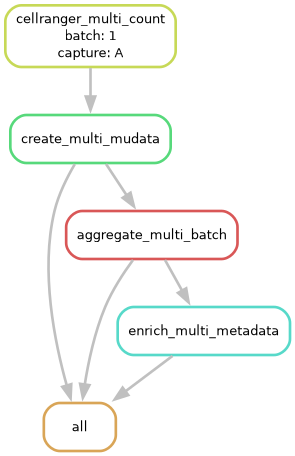
Cell Ranger multi Pipeline DAG processing GEX + VDJ — DAG file showing all rules and their dependencies.
Estimated runtime: ~20–30 minutes
Step
Time
cellranger multi(GEX alignment + VDJ-B assembly)~15–20 min
MuData object creation
~2–3 min
Setup / conda environment overhead
~5 min
# Local run
sc-preprocess run --config-file pipeline_config_multi.yaml --cores 1

# HPC execution
sc-preprocess run --config-file pipeline_config_multi.yaml \
                  --cores all \
                  --snakemake-args --profile HPC_profiles
Check out the companion Jupyter notebook for loading the output and generating QC visualizations: notebooks/MULTI_GEX_VDJ.ipynb.
Example 3: 5’ GEX + VDJ-T + VDJ-B + Antibody Capture
Dataset: Human PBMC from a Healthy Donor, 10k cells, Multi v2.2 — Cell Ranger 5.0.0
Modality: 5’ GEX + TCR (VDJ-T) + BCR (VDJ-B) + Cell Surface Protein
Output: gex + airr (TCR+BCR merged) + prot; cell_id = {batch}_{capture}_{barcode}
Download the FASTQs, GEX reference, VDJ reference, and feature barcode reference from the dataset page, then follow the same steps as Example 2:
Edit the multi config CSV to point to your local FASTQs and references
Create
libraries_list.tsvpointing to the config CSVUpdate
pipeline_config_multi.yamlwithlibraries,output_dir, andproject_nameRun with the commands in the Running section below
Download input data
mkdir tests/GEX_VDJ_CSP && cd tests/GEX_VDJ_CSP

# Input Files
wget https://s3-us-west-2.amazonaws.com/10x.files/samples/cell-vdj/5.0.0/sc5p_v2_hs_PBMC_10k_multi_5gex_5fb_b_t/sc5p_v2_hs_PBMC_10k_multi_5gex_5fb_b_t_fastqs.tar
tar -xf sc5p_v2_hs_PBMC_10k_multi_5gex_5fb_b_t_fastqs.tar

# 2024-A human reference
wget https://cf.10xgenomics.com/supp/cell-exp/refdata-gex-GRCh38-2024-A.tar.gz
tar -xzf refdata-gex-GRCh38-2024-A.tar.gz

# CSP reference
wget https://cf.10xgenomics.com/samples/cell-vdj/5.0.0/sc5p_v2_hs_PBMC_10k_multi_5gex_5fb_b_t/sc5p_v2_hs_PBMC_10k_multi_5gex_5fb_b_t_feature_ref.csv

# Cell Ranger [multi config CSV](https://www.10xgenomics.com/support/software/cell-ranger/latest/analysis/inputs/cr-multi-config-csv-opts)
wget https://cf.10xgenomics.com/samples/cell-vdj/5.0.0/sc5p_v2_hs_PBMC_10k_multi_5gex_5fb_b_t/sc5p_v2_hs_PBMC_10k_multi_5gex_5fb_b_t_config.csv

# VDJ reference
wget https://cf.10xgenomics.com/samples/cell-vdj/5.0.0/sc5p_v2_hs_PBMC_10k_multi_5gex_5fb_b_t/sc5p_v2_hs_PBMC_10k_multi_5gex_5fb_b_t_vdj_reference.tar.gz
tar -xzf sc5p_v2_hs_PBMC_10k_multi_5gex_5fb_b_t_vdj_reference.tar.gz
Edit the multi config CSV
GEX_REF=$(pwd)/refdata-gex-GRCh38-2024-A
VDJ_REF=$(pwd)/vdj_reference
FEATURE_REF=$(pwd)/sc5p_v2_hs_PBMC_10k_multi_5gex_5fb_b_t_feature_ref.csv
FASTQS_GEX=$(pwd)/sc5p_v2_hs_PBMC_10k_multi_5gex_5fb_b_t_fastqs/sc5p_v2_hs_PBMC_10k_5gex_5fb_fastqs/sc5p_v2_hs_PBMC_10k_5gex_fastqs
FASTQS_FB=$(pwd)/sc5p_v2_hs_PBMC_10k_multi_5gex_5fb_b_t_fastqs/sc5p_v2_hs_PBMC_10k_5gex_5fb_fastqs/sc5p_v2_hs_PBMC_10k_5fb_fastqs
FASTQS_VDJ_B=$(pwd)/sc5p_v2_hs_PBMC_10k_multi_5gex_5fb_b_t_fastqs/sc5p_v2_hs_PBMC_10k_b_fastqs
FASTQS_VDJ_T=$(pwd)/sc5p_v2_hs_PBMC_10k_multi_5gex_5fb_b_t_fastqs/sc5p_v2_hs_PBMC_10k_t_fastqs

sed -i "s|/path/to/references/refdata-gex-GRCh38-2020-A|${GEX_REF}|; \
        s|/path/to/references/refdata-cellranger-vdj-GRCh38-alts-ensembl-5.0.0|${VDJ_REF}|; \
        s|/path/to/feature_references/sc5p_v2_hs_PBMC_10k_feature_ref.csv|${FEATURE_REF}|; \
        s|/path/to/fastqs/gex/sc5p_v2_hs_PBMC_10k_5gex_5fb_fastqs/sc5p_v2_hs_PBMC_10k_5gex_fastqs|${FASTQS_GEX}|; \
        s|/path/to/fastqs/gex/sc5p_v2_hs_PBMC_10k_5gex_5fb_fastqs/sc5p_v2_hs_PBMC_10k_5fb_fastqs|${FASTQS_FB}|; \
        s|/path/to/fastqs/vdj/sc5p_v2_hs_PBMC_10k_b_fastqs|${FASTQS_VDJ_B}|; \
        s|/path/to/fastqs/vdj/sc5p_v2_hs_PBMC_10k_t_fastqs|${FASTQS_VDJ_T}|; \
        /expect-cells/a create-bam,true" sc5p_v2_hs_PBMC_10k_multi_5gex_5fb_b_t_config.csv
Set up pipeline files
echo -e "batch\tcapture\tCSV" > libraries_list.tsv
echo -e "1\tA\tsc5p_v2_hs_PBMC_10k_multi_5gex_5fb_b_t_config.csv" >> libraries_list.tsv
Update pipeline_config_multi.yaml:
cellranger_multi.libraries→ path tolibraries_list.tsvoutput_dir→ where to write outputsproject_name→ your project name
Running
# Dry run
sc-preprocess run --config-file pipeline_config_multi.yaml --cores 1 --dry-run

sc-preprocess run --config-file pipeline_config_multi.yaml --cores 1 --dag | dot -Tpng > dag_multi_GEX_VDJ_CSP.png
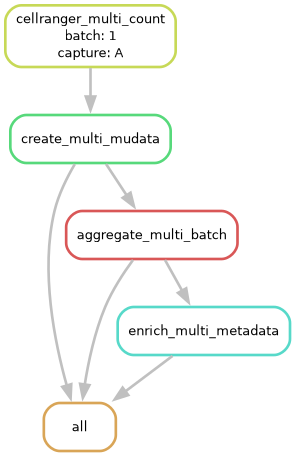
Cell Ranger multi Pipeline DAG processing GEX + VDJ + CDP — DAG file showing all rules and their dependencies.
Estimated runtime: ~60–90 minutes
Step
Time
cellranger multi(GEX alignment + VDJ-T + VDJ-B assembly + protein)~45–75 min
MuData object creation
~5–10 min
Setup / conda environment overhead
~5 min
# Local run
sc-preprocess run --config-file pipeline_config_multi.yaml --cores 1

# HPC execution
sc-preprocess run --config-file pipeline_config_multi.yaml \
                  --cores all \
                  --snakemake-args --profile HPC_profiles
Check out the companion Jupyter notebook for loading the output and generating QC visualizations: notebooks/MULTI_FLEX_V2_analysis.ipynb.